If you’ve looked at many URLs, you’ve seen a fbclid. Click a link on Facebook or Instagram that goes to another site, and Facebook tacks ?fbclid=... onto the end of it. Back in the v2022.11 Unfurl post, I said I had no idea (yet!) how to parse anything out of an fbclid. The best I could do was infer from the key that the link came from Facebook.
That “yet” finally paid off. The latest Unfurl release decodes newer fbclid values, and this post goes into the details of what’s inside them (including timestamps!).
It’s important to note that everything here is reverse-engineered. Meta doesn’t document the fbclid format, and the field meanings below are my best guesses based on a lot of examples.
Two Generations of fbclid
To dig into this, I collected a bunch (~50k) of URLs with a fbclid parameter from URL capture projects like Common Crawl and the Wayback Machine. I could divide these into two groups, which I’m calling legacy and modern:
| Format | In use | Length | Extractable Data |
|---|---|---|---|
| Legacy | 2018 - early 2024 | Almost always 61 characters | Platform (Facebook v Instagram) |
| Modern | April 2024 - present (2026) | Usually 100 to 190 characters | Platform, and sometimes timestamps, app, and other IDs |
The legacy IwAR... values are the ones I was examining in 2022, and their contents still don’t decode into anything really useful. Most of my sample is older crawl data, so there are a lot of them. Old links stick around on pages, so legacy values still show up in recent captures, but those were probably generated years earlier. Even those aren’t useless. As we’ll see below, the first two characters tell you whether the click came from Facebook or Instagram.
The Header
The first two characters in both legacy and modern generations are almost always Iw or PA. They aren’t part of the encoding; the base64-decoding starts right after them (we’ll get to that). Iw means the fbclid was generated on Facebook, and PA means it came from Instagram.
I worked this out by comparing the header to the App ID inside the payload (more on App IDs below), and the split is almost perfect. Every Facebook App ID (the website, the Android and iPhone apps, Facebook Lite, Messenger) only shows up with Iw, and every Instagram App ID only shows up with PA. The only exception is the older “WWW” App ID, which shows up with both.
Legacy fbclid Structure
Legacy values use the same two header values (IwAR and the much rarer PAAa). Even when nothing else decodes, the header still tells you which platform the click came from.
Here’s a legacy fbclid in Unfurl’s graph view. After the header, there’s what I’m calling a payload of URL-safe base64 that decodes to a marker byte, a version byte, and 42 bytes I can’t interpret yet:
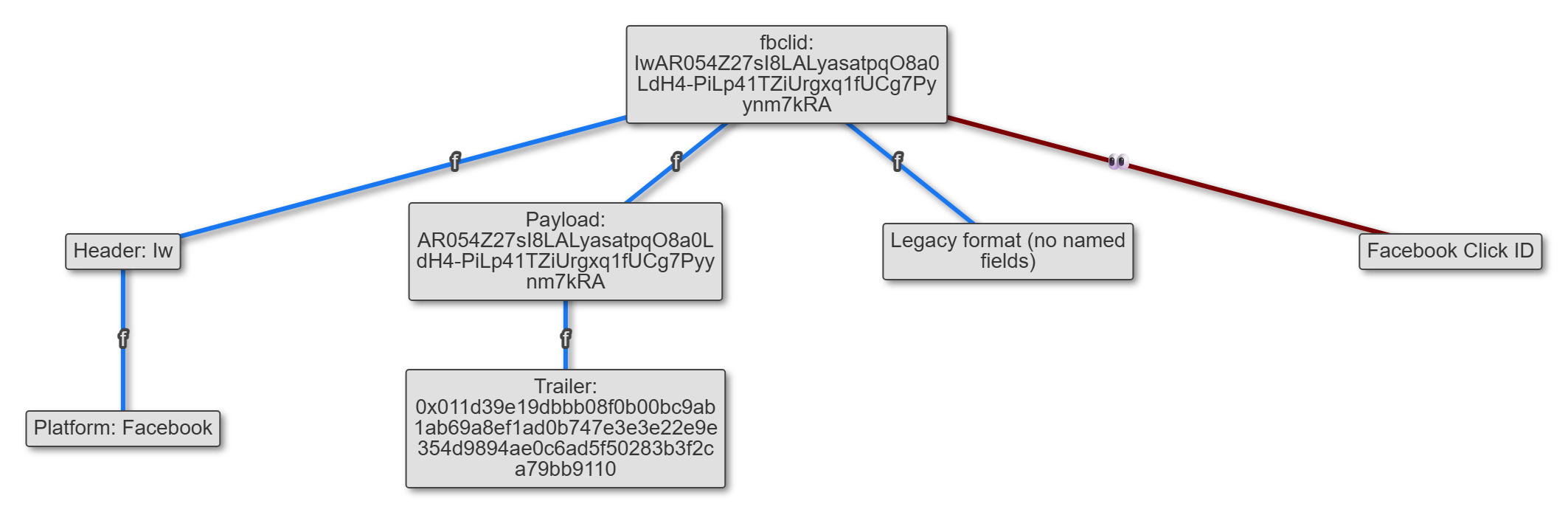
It’s not much, but still a little better than what I had in 2022.
Anatomy of a Modern fbclid
The modern ones are different; they carry a varying number of named fields after the header, but in front of the same kind of blob, which is why they’re longer and vary in length. Here’s an example, from a link clicked on Facebook in April 2026:
IwY2xjawRHIChleHRuA2FlbQIxMQBzcnRjBmFwcF9pZBAyMjIwMzkxNzg4MjAwODkyAAEeSrOIwedpPOsVFYx6K_0LJNBn9kgA89IDYJ4VuJh0BY0MG1HG9gKq1gjYbuU_aem_LrxkLDAS8wyPt0OpHXlIqwIt has three parts:
- a 2-character header (
Iwhere) - a payload of URL-safe base64 (everything up to
_aem_) - an optional AEM suffix (
_aem_plus 22 more characters)
The Payload
Move past the header and base64-decode the rest (except the trailer, if present), and things get interesting:
0000:  63 6c 63 6b 04 47 20 28 65 78 74 6e 03 61 65 6d  clck.G (extn.aem
0010:  02 31 31 00 73 72 74 63 06 61 70 70 5f 69 64 10  .11.srtc.app_id.
0020:  32 32 32 30 33 39 31 37 38 38 32 30 30 38 39 32  2220391788200892
0030:  00 01 1e 4a b3 88 c1 e7 69 3c eb 15 15 8c 7a 2b  ...J....i<....z+
0040:  fd 0b 24 d0 67 f6 48 00 f3 d2 03 60 9e 15 b8 98  ..$.g.H....`....
0050:  74 05 8d 0c 1b 51 c6 f6 02 aa d6 08 d8 6e e5     t....Q.......n.
There are field names in there: clck, extn, srtc, app_id. After analyzing a few thousand of these, I worked out that the payload is a list of fields, each a 4-character name followed by a value, with the values having specific types:
clck,tdcp,omex, and a bunch of other names are followed by a 4-byte number (more on these below)adidis an 8-byte numberpdofis a single bytebrid(and a couple of rarer fields) is a string, with a length byte in frontextnandsrtcare small maps of length-prefixed key/value strings, ended by a00byte
Walking through the example:
clck→04 47 20 28(a 4-byte number: 71,770,152)extn→ {aem:11}00srtc→ {app_id:2220391788200892}0001 1e+ 44 bytes of binary
Here’s the same payload in Unfurl’s graph view:
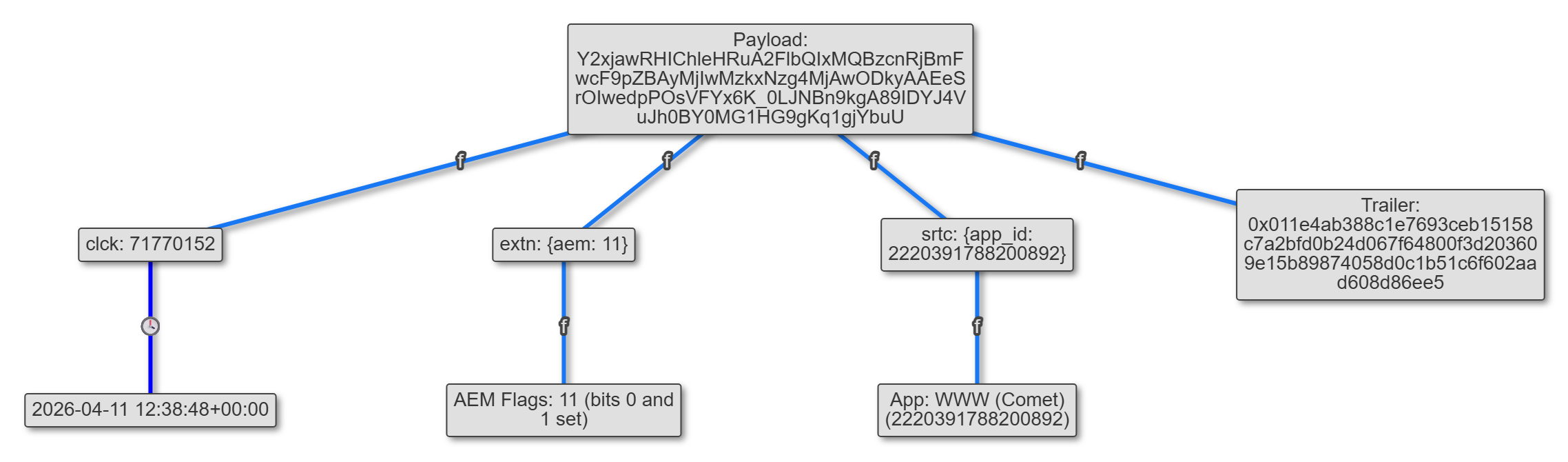
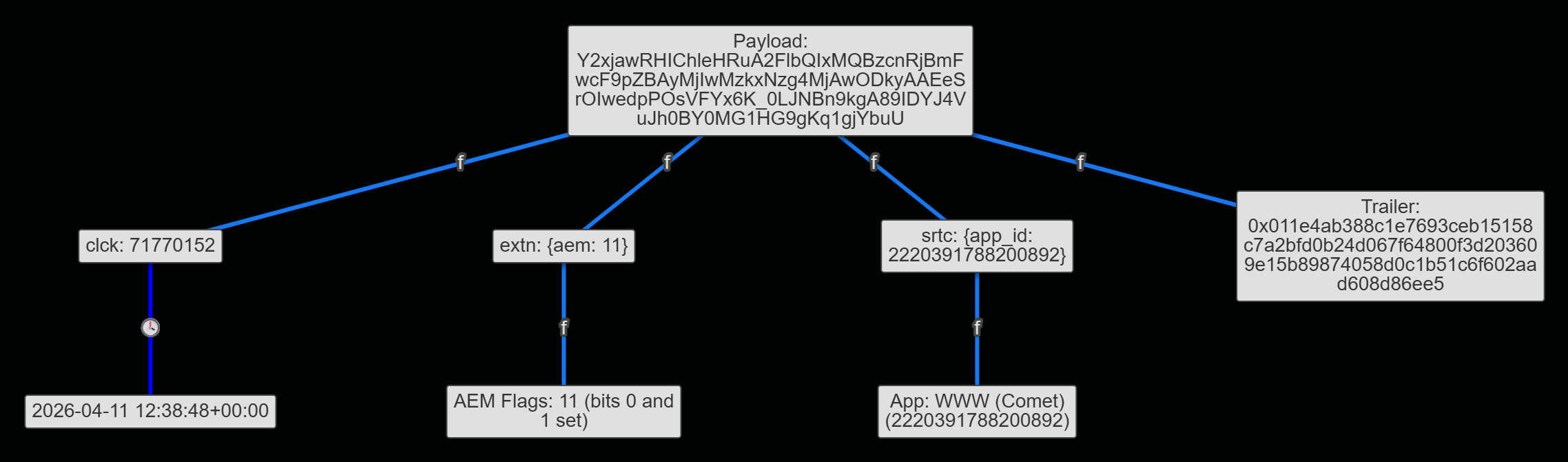
After any named fields, there’s a last chunk that’s always there. Its first two bytes appear to be a marker and a version number (more on that below), but I can’t interpret the rest. It has the same format as a whole legacy fbclid (those decode to a 01 1d followed by 42 bytes), so the modern format looks like the old one with named fields added in front. My guess is that the chunk is a signature or an ID Facebook checks on its side.
The second byte of that chunk works like a version number. Facebook values have 1d or 1e, and Instagram values have a6 or a7. In both cases the bigger number goes with a chunk that’s two bytes longer, as if both platforms bumped a version at the same time.
This structure fully parses over 99% of the modern fbclids in my sample; the rest are truncated or mangled copies.
The AEM Suffix
If _aem_ is present, the characters after it usually base64-decode to a 16-byte value. AEM stands for Aggregated Event Measurement, Facebook’s privacy-preserving ad attribution system, built in response to Apple’s App Tracking Transparency changes. The value itself is opaque, and I can’t tell whether it’s a hash or some kind of token. About 2% of the AEM suffixes are longer (88 characters, or 66 bytes), and I haven’t figured out what the difference is.
Almost every fbclid in my sample has a different AEM value, but the repeats I looked at stick to one advertiser. The same value shows up on an advertiser’s different country domains, or on their main site and their jobs site. That doesn’t fit a random per-click token; it looks more like something derived from the advertiser or campaign, maybe combined with something about the user.
Timestamps
If you’re familiar with Unfurl, you know something I’m always on the lookout for is timestamps embedded in things. When I had an indication that some decoded values were large numbers that went up steadily with time, I was excited. In fbclids that contained a clck value and an external timestamp of when their URLs were captured, the clck numbers increased in proportion with time, about one per second. They are timestamps, just not from the standard Unix epoch!
To find the epoch, I subtracted each clck (and the other 4-byte fields) from the time the URL was captured. Since a URL can’t be captured before its fbclid was created, the smallest of those differences should be right about the epoch (assuming the capture was done very close to creation time). Different sources gave me nearly the same answer:
| Source | Earliest implied epoch |
|---|---|
| Recent captures (Jul to Oct 2026) | 2024-01-01 20:29:41 UTC |
| Earlier captures (Dec 2025 to Apr 2026) | 2024-01-01 20:29:47 UTC |
| Wayback Machine | 2024-01-01 20:29:43 UTC |
| Common Crawl | 2024-01-01 20:30:24 UTC |
Some of the URLs were captured within seconds of being clicked, so the differences cluster right at that time. Different capture sources had different minimums, but all were pretty close, with the smallest being 2024-01-01T20:29:41Z. Common Crawl’s is a little later, but its crawler usually shows up well after a link is clicked.
That method only gives an upper bound, though. If even the fastest captures happened a few seconds after the click, the real epoch is a few seconds earlier. I did some testing to try to narrow it further. I clicked some links, logging the exact time of each click in the browser and collecting the URL I landed on. The links on the page already had an fbclid on them, just without a clck; it got added when I clicked. Using the epoch above, clck decoded to 4.75 seconds after my logged click, both times. So the capture-based estimate was about five seconds late, and shifting it to line up with the clicks gives:
Unix time = value + 1,704,140,976
That’s 2024-01-01 20:29:36 UTC, which is a strange epoch. It doesn’t map to a round number in any format I tried; it’s probably just the moment someone generated it, around lunchtime Pacific on New Year’s Day 2024. Again, this is not a documented epoch from Meta, and it’s calibrated on only a couple of clicks, so treat it as accurate to a second or two.
For our example, clck is 71,770,152. Add 1,704,140,976 and you get 2026-04-11 12:38:48 UTC; that URL was captured at 12:39:20 UTC, 32 seconds later. None of the timestamps from Common Crawl or the Wayback Machine came after the capture that saved them.
About 80% of the modern fbclids in my sample have at least one of these timestamp fields. Which one you get mostly depends on the platform:
- Facebook (
Iw):clck(the most common, by far),tdcp,tdsh,omex,aosb - Instagram (
PA):tdsv,omcp,igrd,bocl, and usuallytdexandaoex - Either:
ftsh, plus a few rare ones (sscp,igdl,ioex)
These also show up in uppercase (TDCP, OMEX, and so on), and I don’t know what the case means. When an fbclid has two timestamps (like tdcp and clck), they’re usually 3 to 15 seconds apart, with clck first.
For an investigation, this is the most useful part. A modern fbclid tells you when the link was clicked, from just the URL. I’ve only tested clck (clicking links on the Facebook website), where it matched the click to the second. The other timestamp fields are probably similar, but I haven’t tested them yet.
The Other Interesting Fields
Here are the rest of the fields I’ve seen, and how useful I think they are for an investigation:
| Field | What I think it is | DFIR value |
|---|---|---|
brid | Browser ID | High: links clicks from the same browser |
app_id (in srtc) | Facebook App ID of the app that generated the link | Medium: tells you the platform |
adid | An ad-related ID, present when the click came from an ad | Medium: marks an ad click, but it isn’t the ad’s ID |
aem (in extn) | Some kind of AEM flag: 0, 1, 10, 11, or 100 | Low |
pdof | A 1-byte number, 1 to 5 | Unknown |
There are a few rarer ones too (fdid, afdk, usrm, tsaf), but I’ve only seen them a handful of times, so I’m not going to guess at those.
brid
The brid is always 17 characters, starting with 0, 1, or 2, and about a fifth of the modern fbclids in my sample have one. The name made me think it identifies a browser. Around 10% of the brids I found show up in more than one different fbclid, and those repeats span days or months, different sites, and even different App IDs. One brid showed up in dozens of different fbclids over eight months, on nearly as many different sites, mostly throwaway Replit and Netlify hosts. My data skews towards suspicious URLs, and that one looks like someone testing or investigating phishing pages, not a victim.
It also only shows up with the web App IDs: WWW (Comet), BizWeb, and the unresolved one below. I never saw a brid with the Facebook or Instagram mobile apps, so it’s tied to a web browser, not Facebook’s in-app browser on mobile.
If you find two URLs with the same brid, that’s a strong indicator they were clicked in the same web browser, even if they were clicked weeks apart or landed on unrelated sites. I don’t know exactly what it’s tied to (a browser profile, a cookie, a logged-in account), so use with that caveat.
app_id
The app_id is a Facebook App ID, and those can be looked up. Facebook’s Graph API will return the name for one, without needing to log in (https://graph.facebook.com/2220391788200892 returns WWW (Comet)). I ran the App IDs from my sample through it; here are the most common, in order:
| App ID | Name |
|---|---|
567067343352427 | Instagram for Android (Analytics Only) |
2220391788200892 | WWW (Comet) |
350685531728 | Facebook for Android |
124024574287414 | |
541639493889025 | (doesn’t resolve) |
6628568379 | Facebook for iPhone |
256281040558 | WWW |
275254692598279 | Facebook Lite |
409962623085609 | Facebook Lite for Web (WebLite) |
936619743392459 | Instagram Web |
437626316973788 | Messenger for iOS |
“WWW (Comet)” is Facebook’s current React-based web frontend, and plain “WWW” looks like the older one. There’s a long tail too, including BizWeb, Power Editor, Business Manager, and Ads Events Manager, and those fit with some of these links coming from the advertising side. One ID (541639493889025) is fairly common, but the Graph API returns an error for it. It always has an Iw header, usually has a brid, and shares brids with WWW (Comet), so it’s probably another part of the Facebook website.
Our example fbclid, with an app_id of 2220391788200892, came from a link clicked on the Facebook website. This is handy even when nothing else in the URL points to Facebook, since an fbclid with one of Instagram’s App IDs (or just a PA header) tells you the traffic came from Instagram.
The Ones That Don’t Decode
A few hundred of the values in my sample didn’t fit either format:
- Lowercased values, where something along the way lowercased the whole URL (
iwy2xjaw...). Base64 is case-sensitive, so these can’t be decoded. Iwfollowed by bytes that look completely random, with no field names and no01 1d/01 1echunk. They’re oddly consistent in size. They’re either 44 bytes with no_aem_, or 56 bytes with a longer-than-usual 93-character_aem_. Most were from July 2026; my guess is an encrypted variant or an experiment on Facebook’s side.
Unfurl doesn’t try to decode any of these, but it will point out the lowercased ones.
Try It
Unfurl decodes all of this automatically; just paste in a bare fbclid value or a URL with an fbclid in it (try it with the example). It splits the fbclid into the same parts as above (header, payload, and AEM suffix), so you can see where each value came from. It shows the platform, pulls out the timestamps and the browser ID, resolves the App ID to a name, and shows the ad-related ID and AEM value when they’re present. For legacy values, it still shows the platform.
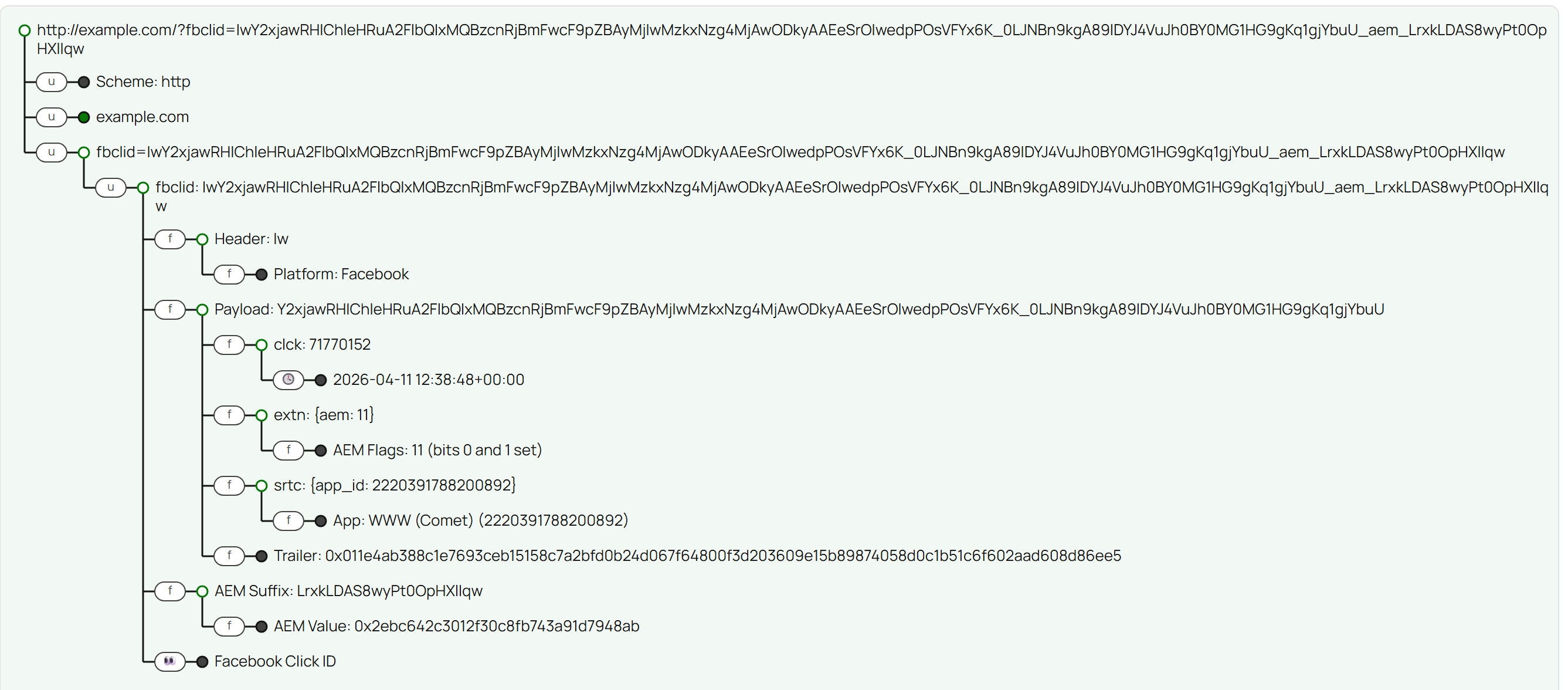
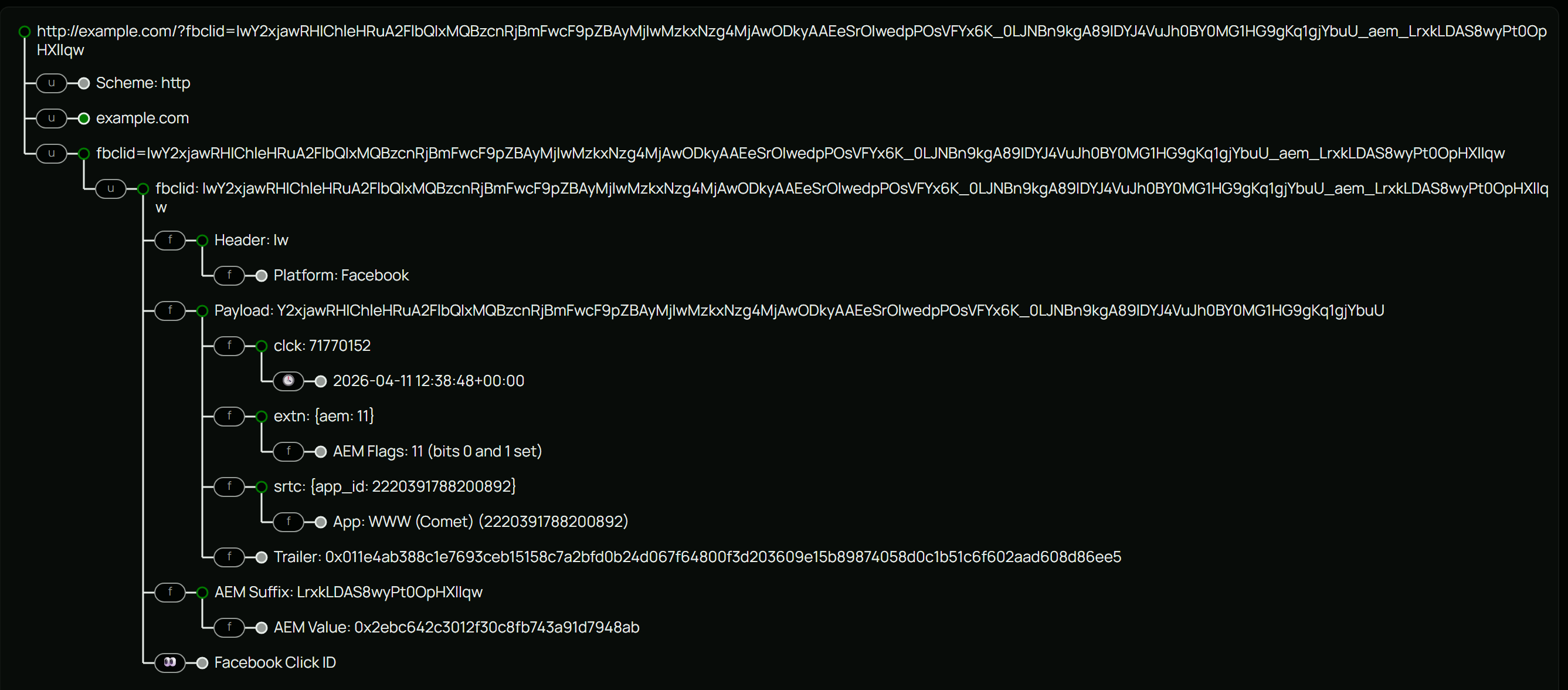
You can use Unfurl online, get the code on GitHub, or install it with pip install dfir-unfurl.