ChatGPT URLs pop up everywhere, including browser history, chat logs, proxy logs, and even phishing redirect chains. ChatGPT conversation URLs in particular caught my interest, since they have what looks like a UUID embedded in them: https://chatgpt.com/c/69d14837-c894-83e8-be51-203e72906522.
This post details what’s inside these UUIDs (spoiler: there’s a timestamp). As with the fbclid post, everything here is reverse-engineered. OpenAI doesn’t document these formats, and the field meanings below are my best guesses based on a lot of examples. I’ve tried to be clear about which parts are directly observed and which are educated guesses.
A Quick UUID Refresher
UUIDs have come up on this blog a few times over the years, so here’s a quick recap before getting to the new stuff.
A UUID is a 128-bit identifier, usually written as 32 hex characters split into five groups (8-4-4-4-12). Two small pieces of every UUID are fixed: the version (the first hex character of the third group) and the variant (the top bits of the fourth group; for standard UUIDs, that hex character is always 8, 9, a, or b). The version tells you how the other 122 bits were made, and that’s where the forensically interesting stuff is:
- UUIDv1 has a timestamp and a node ID, which is often the MAC address of the machine that made it. Unfurl has parsed these from the start, and v2021.06 added detection of when that node ID is a random number rather than a real MAC.
- UUIDv4 is random; there’s nothing to extract. UUIDv5 is a hash of a name. Neither has a timestamp, but as I found with LinkedIn message threads, a site switching from one version to another can still tell you something about when an ID was made.
- UUIDv6 and v7 came along with RFC 9562 in 2024. Both have timestamps up front so they sort by creation time, which makes v7 popular for database keys. Unfurl v2026.09 extracts the timestamps from both.
Which leaves UUIDv8. RFC 9562 defines it as the “custom” or vendor-specific version: the version and variant bits are fixed, and the other 122 bits can be whatever the vendor wants. This means there could be interesting and useful stuff embedded in them, but each vendor can do it however they want, and unless they publish what they’re doing, it’s up to us to reverse engineer the format. Until now, the best Unfurl could do with a UUIDv8 was say “this is vendor-specific” and move on, since there’s no generic way to know what’s inside.
Since ChatGPT is so pervasive now, I decided to take a crack at understanding how OpenAI is using UUIDv8.
Two Generations of ChatGPT IDs
To figure out the layout, I collected about 284,000 unique ChatGPT IDs from the Wayback Machine, Common Crawl, and my own URL corpus. They fall into two groups:
| Era | Conversation ID | Time in ID? |
|---|---|---|
| Launch to 2024-08-29 | UUIDv4, like 3f6c2b1e-9a4d-4c2f-8e1b-5d7a9c0b2e4f | No, random |
| 2024-08-30 onward | UUIDv8, like 69d14837-c894-83e8-be51-203e72906522 | Yes! |
Even the older v4 IDs are a little useful: like the LinkedIn example above, a ChatGPT conversation with a UUIDv4 ID was almost certainly created before 2024-08-30.
Anatomy of a ChatGPT UUIDv8
Here’s how the bits of a newer ID break down:


| Hex chars | Field | Notes |
|---|---|---|
| 0-7 | Timestamp | Unix seconds; when the ID was created |
| 8-11 | Sub-second | 14 bits of fraction-of-a-second, then two bits that are always 0 |
| 12 | Version | Always 8 |
| 13-15 | Node | Values in deliberate ranges; probably a server or shard ID |
| 16-31 | Random | 2 variant bits, then 62 random bits |
Walking through the example (a real conversation ID from the Wayback Machine, which captured it 38 seconds after it was created):
69d14837→ 1,775,323,191 → 2026-04-04 17:19:51 UTCc894→ sub-second fraction of about 0.7835 (probably; more on that below)8→ version 83e8→ node 1000be51203e72906522→ variant bits and randomness
The Timestamp
The first 8 hex characters are a plain big-endian Unix timestamp, in seconds. To check that it’s the creation time, I compared it to when the Wayback Machine first captured each URL. Since a URL can’t be archived before it exists, the embedded time should never be later than the first capture.
Across over 180k UUIDv8 conversation IDs with a capture time, the vast majority had an embedded time earlier than their first capture (a handful didn’t, but I’d say that’s just a hazard of the high count of the collected URLs - there’s always weird outliers). Most were captured within seconds to minutes of their embedded time (the median gap was 71 seconds; lots of these look like they were saved to the Wayback Machine right after being created).
The main takeaway from this post is that a ChatGPT conversation URL tells you when that conversation was created. Similar to Twitter snowflakes and other embedded IDs discussed on this blog, this timestamp extraction works from the URL string alone; you don’t need to access the URL (it can be unreachable, private, or not even online anymore, and this technique still works).
The Sub-Second Field
The next 4 hex characters (16 bits) always have their two lowest bits set to 0, so the real value is the top 14 bits. Its meaning changed partway through:
- From 2024-08-30 to about 2024-10-28, the 14-bit value never went above 15,258. That’s a very specific number: it’s exactly what you get from 999,999,999 (the largest possible nanosecond count within a second) shifted right by 16 bits. So in this era, the field was nanoseconds-within-the-second in units of 65.536 µs. That’s convincing proof that it’s a time field.
- From 2024-10-28 (complete by 2024-11-03), the value covers the full 0 to 16,383 range evenly. My best guess is that it’s now a binary fraction of a second (value / 16,384), but I can’t confirm that from the IDs alone. I could at least rule out one alternative: it’s not milliseconds scaled up to 14 bits, since nearly every one of the 16,384 possible values shows up, not just the 1,000 that milliseconds would produce.
The Node Field
The 12 bits after the version character aren’t random. They come in deliberate decimal ranges, which makes me think they’re server, cluster, or shard IDs rather than hashes:
| Node (decimal) | Third group | First seen | Last seen |
|---|---|---|---|
| 0-19 | 8000-8013 | 2024-08-30 | 2025-08-05 |
| 800-819 | 8320-8333 | 2025-07-17 | 2026-09 (rare after 2026-07) |
| 900-939 | 8384-83ab | 2026-01-21 | 2026-07 |
| 1000 | 83e8 | 2026-02-11 | current |
| 1001 | 83e9 | 2026-03-12 | current |
| 1002 | 83ea | 2026-04-10 | current |
| 1003 | 83eb | 2026-04-17 | current |
| 1004 | 83ec | 2026-05-08 | current |
| 1005 | 83ed | 2026-06-05 | current |
| 1006 | 83ee | 2026-06-11 | current |
These dates are for conversation IDs, and the “last seen” dates are where the bulk of each range stops: a single node 1 ID turns up in October 2025, and one 900-range ID in September 2026. There are a few small oddballs too (node 25 for a few weeks in mid-2025, a scattering in the 824-835 range, and node 946 for two IDs), which look like tests or canaries. By August and September 2026, nearly all new conversation IDs come from nodes 1000-1006.
This gives a nice consistency check, with one catch: the ranges are shared across products, and they don’t all move at the same time. Codex tasks were using nodes 800-819 from June 2025, about seven weeks before conversations moved there. So a node narrows down the date only when you know what kind of ID you’re looking at.
The Random Part
After the two variant bits, the remaining 62 bits are evenly distributed at every bit position across the sample. I didn’t find any more structure in there.
When the Switch Happened
The earliest UUIDv8 conversation ID I found is 66d1a074-c6c4-8006-9aab-940b1dd54a04, with an embedded time of 2024-08-30 10:35:32 UTC. The Wayback Machine captured it 1 minute and 43 seconds later. The rollout looks like a fairly standard canary-then-everyone deployment:
- 2024-08-30 to 2024-09-02: only a handful of IDs, all from node 6
- 2024-09-03 to 2024-09-04: all 20 nodes (0-19) show up within about 24 hours
The old UUIDv4 conversation IDs fade out at the same time:
| Month | v4 conversations first captured | v8 conversations (by embedded time) |
|---|---|---|
| 2024-07 | 11,154 | 0 |
| 2024-08 | 12,627 | 6 |
| 2024-09 | 2,647 | 29,098 |
| 2024-10 | 92 | 12,054 |
| 2024-11 | 191 | 28,380 |
The handful of v4 captures after September 2024 are old conversations resurfacing, not new ones.
Other ChatGPT and OpenAI IDs
Once I had the layout figured out, I went looking for it in other ChatGPT and OpenAI URLs (and in OpenAI API responses that people have pasted into public GitHub issues, which conveniently include a created time to check against). It’s everywhere. All of these are the same 128 bits (timestamp, sub-second, version 8, node, random), either dashed like a conversation ID or written as 32 hex characters with no dashes, usually behind a prefix:
| Where | Format | What it is |
|---|---|---|
chatgpt.com/g/ | g-{32 hex}-{name} | Custom GPT (from 2024-11) |
chatgpt.com/g/ | g-{9 chars}-{name} | Custom GPT (older format, no timestamp) |
chatgpt.com/g/ | g-p-{32 hex}-{name}/project | Project |
chatgpt.com/g/{gpt or project}/c/ | {uuid} | Conversation inside a GPT or project |
chatgpt.com/share/ | {uuid} | Shared conversation link |
chatgpt.com/share/e/ | {uuid} | Shared link; probably a workspace-restricted (Team/Enterprise) share |
chatgpt.com/s/ | m_{32 hex} | The most common kind of share link. My guess is “m” for message |
chatgpt.com/s/ | t_{32 hex} | Shared text snippet |
chatgpt.com/s/ | dr_, cd_, cx_ + 32 hex | Other share types; going by the names, probably deep research, canvas documents, and Codex |
chatgpt.com/s/ | {32 hex} | Share link with no prefix |
chatgpt.com/codex/tasks/ | task_e_{32 hex} (also task_b_, task_i_) | Codex cloud task |
chatgpt.com/codex/settings/environment/ | {32 hex} | Codex environment |
sora.chatgpt.com/p/ | s_{32 hex} | Sora 2 post |
operator.chatgpt.com/c/ and /v/ | {32 hex} | Shared Operator conversations and videos |
chatgpt.com/...?notification_id= | {32 hex} | The notification that opened the link |
| OpenAI API | vs_, batch_, eval_, cfile_ + 32 hex | Vector stores, batches, evals, container files |
| OpenAI API | cntr_ + 48 hex | Containers (an object ID plus 16 more hex characters) |
| OpenAI API | resp_, msg_, fc_, rs_ + 50 hex | Responses API items |
The chatgpt.com URLs also work on the old chat.openai.com hostname. GPT and project IDs almost always have a node value of 401 (0x191), so 8191 shows up in the same spot in nearly every one:


That example GPT was created 2024-11-18 13:40:43 UTC. Combining these can be neat; take this conversation-in-a-project URL:
chatgpt.com/g/g-p-6a00000012348191a1b2c3d4e5f60718/c/6a0007d0-1234-83ec-9abc-0123456789ab(That one’s made up, but it follows the real layout.) The project was created at 2026-05-10 03:48:16 UTC, and the conversation inside it 33 minutes and 20 seconds later. That ordering held in every one of the 626 archived GPT conversation URLs I found: the conversation was always created after the GPT it sits in. (I didn’t have enough archived project conversation URLs to check projects the same way, but I’d expect the same.)
Chat Completions IDs: A Different Scheme
Not everything uses the hex layout. Chat Completions IDs from the OpenAI API look like chatcmpl- followed by 29 letters and numbers (for example, chatcmpl-BdQPIabcdefghijklmnopqrstuvwx). The first 5 characters are a timestamp: read them as a base62 number (0-9, A-Z, a-z) and add 1,576,800,000, and you get the Unix time the response was created. That magic number is 2019-12-20 00:00:00 UTC.
I tested this against 152 public API responses (from March 2023 to October 2026) where the ID sits next to the response’s created field. It matched in 150 of them (138 exactly and 12 off by one second); the other 2 were IDs that had been pasted next to a different response. The older cmpl- IDs from the original Completions API work the same way (18 of 19 matched). For the example above, BdQPI decodes to 2025-06-01 00:00:00 UTC.
This only applies to OpenAI’s own 29-character IDs. Many other servers that copy OpenAI’s API format (local model servers, proxies, other vendors) also use chatcmpl-, but with UUIDs or other formats that don’t have a time in them.
These IDs show up outside of API logs, too. People save API-generated images using the ID as the file name, and when those images end up on websites, the decoded time lands in the same month as the site’s upload folder every time I checked.
Sora Generation IDs Are ULIDs
Sora generation and task links (sora.com/g/gen_..., sora.chatgpt.com/t/task_...) use 26-character lowercase ULIDs after the prefix. The first 10 characters are a millisecond timestamp. None of about 2,350 archived IDs had a time later than its first capture. The earliest generation ID I found is from 2024-11-19, about three weeks before Sora’s public launch. (Sora 2 posts, under /p/s_, use the hex layout instead.)
Recognizing IDs Without a URL
ChatGPT IDs don’t always come with a chatgpt.com URL attached. Because so many of the bits are fixed or limited, a bare UUID can be matched to this layout with very few false positives. Unfurl’s check requires:
- version 8 and the standard variant
- the two low sub-second bits set to
0 - a timestamp between 2024-08-30 and now
- a node value in 0-31 or 800-1023
- the usual dashes (
8-4-4-4-12)
That last one is new. To see how often the check misfires, I ran every UUIDv8 in my URL corpus that wasn’t in a ChatGPT or OpenAI URL through it. None of the 622 dashed ones passed. But Unfurl also treats 32 hex characters without dashes as a possible UUID, and that’s where the trouble was: out of about 148,000 undashed hex values that happened to look like version 8, 8 passed, and all 8 were wrong. They were things like profile-picture hashes and image file names that were plainly not ChatGPT IDs (one sat in a 2014 upload folder but “decoded” to 2025). ChatGPT always writes conversation and share IDs with dashes, so Unfurl now requires them when there’s no ChatGPT URL around the ID.
Bare GPT and project IDs (like g-673b43dbe89081918262b99d6aa366dc) get a similar check: the right layout, a node in the 400s, and a plausible time. API IDs, Chat Completions IDs, and image file names all have a fixed prefix and length, and are only decoded if the layout (or the time) checks out.
Try It
As of v2026.11, Unfurl decodes all of this automatically. Here’s the example conversation URL from the top of the post (try it yourself):
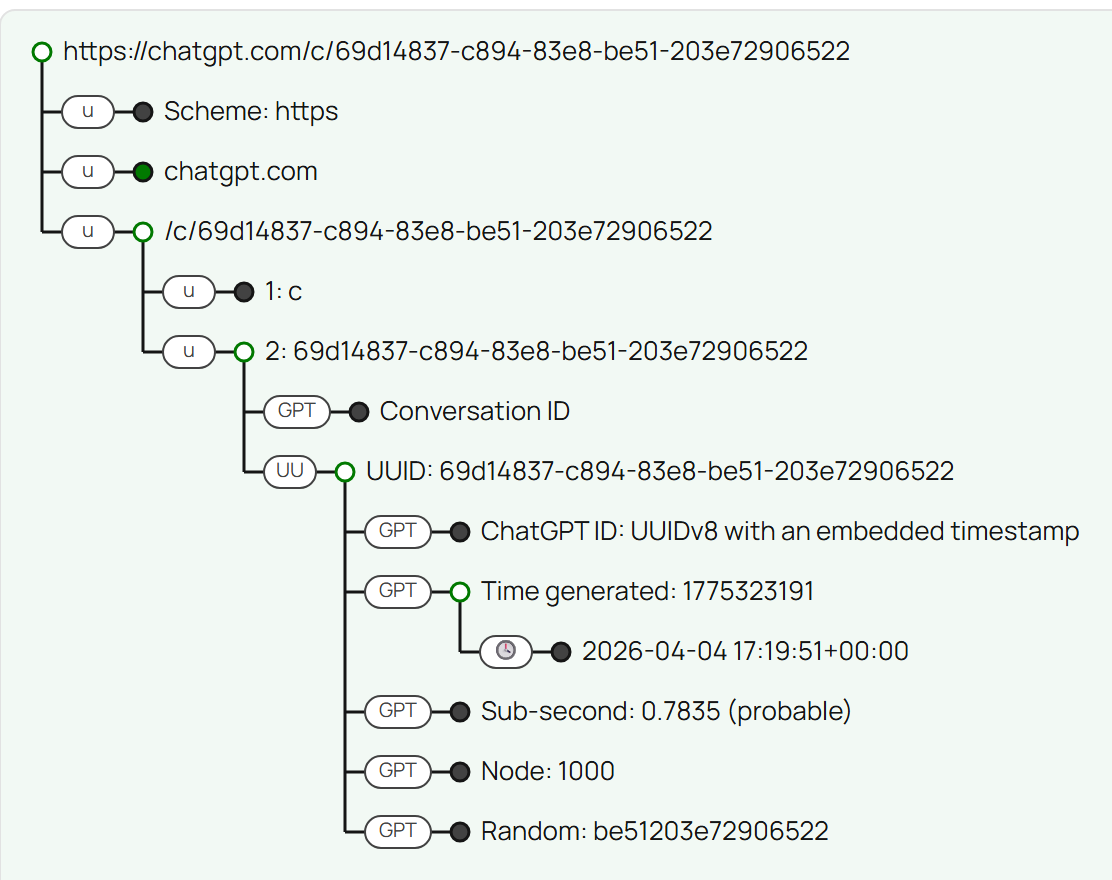
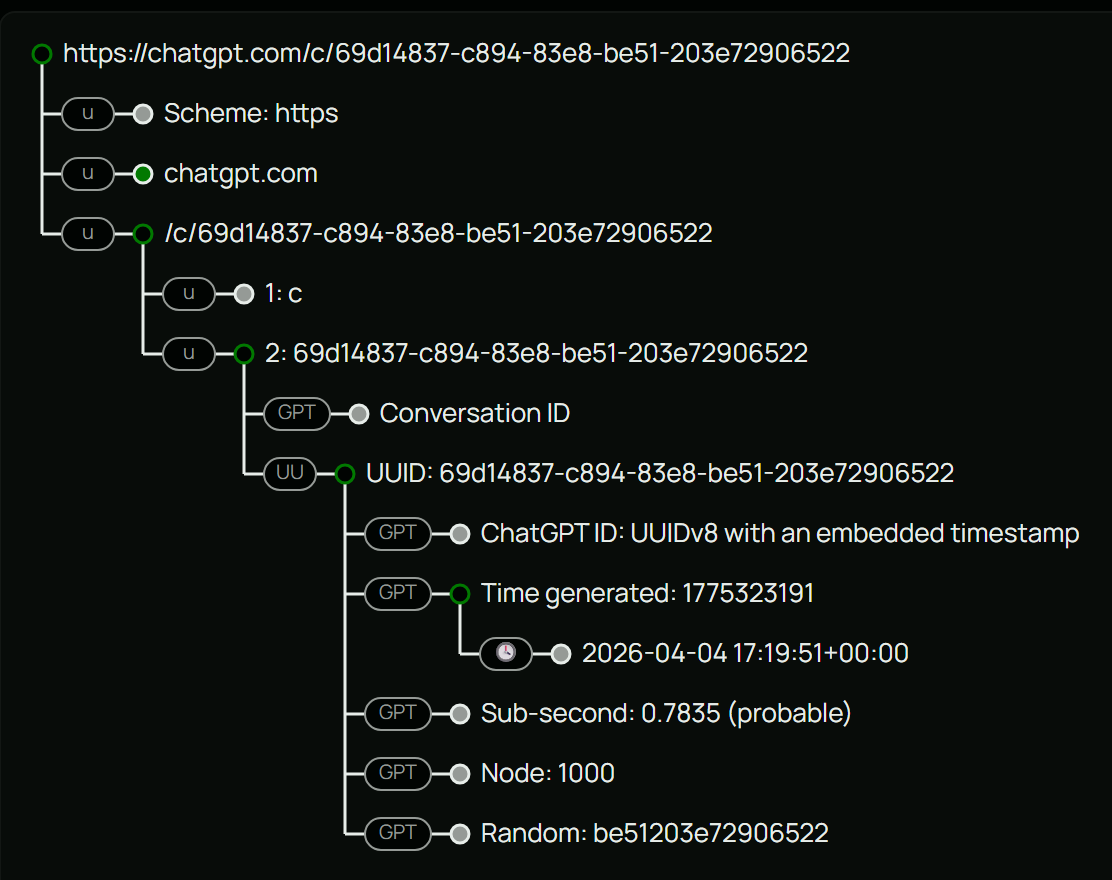
Paste in a ChatGPT URL and it will:
- label conversation, share, workspace share, GPT, project, Operator, Codex, and Sora IDs
- decode IDs with the hex layout into the timestamp, sub-second value, node (with notes on when that node range was in use), and random bits, including
/s/share links, notification IDs, and API IDs likeresp_andvs_ - decode
chatcmpl-IDs and Sora generation IDs into their timestamps - flag timestamps that predate the format
- mark UUIDv4 IDs as the older format, which dates them to before the switch
- explain ChatGPT query parameters, like
historySearchQueryand prefilled prompts - decode bare UUIDs (and bare
g-,t_, and API IDs) that pass the strict checks above, with a more cautious label
You can use Unfurl online, get the code on GitHub, or install it with pip install dfir-unfurl -U. If you have a ChatGPT or OpenAI ID that doesn’t fit the patterns here (or know when one of your share links was created), please let me know!